iOS · Mobile · AI
ChartLens AI
ChartLens AI takes a photo or screenshot of a price chart, sends it to a vision model through its own backend, and returns a structured read of what is on it — alongside a trade journal and a set of lessons.
- Role
- Sole developer — iOS app, backend API, in-app purchase and entitlement handling
- Year
- 2026
- Live
- App Store
- Swift
- SwiftUI
- Node.js
- Express
- SQLite
- JWT
- StoreKit 2
- RevenueCat
What it does
Reading a chart is a skill, and most people learning it are looking at one without knowing which parts matter. The information is on the screen; the vocabulary to describe it is not.
ChartLens AI is built around that gap. You capture the chart you are already looking at, tell it which market it belongs to, and get back a structured read — levels, structure, and a way to ask follow-up questions about the same chart.
Around the analyser sits a trade journal with its own statistics, and a set of lessons covering the ideas the analysis refers to: support and resistance, moving averages, MACD, risk-to-reward, position sizing, stop-loss strategies, and the psychological side of trading.
Built for people learning technical analysis who want a second read on a chart and somewhere to keep a record of their own trades.
What I did
I am the sole author of every commit in the repository — the SwiftUI app and the Node backend it talks to.
The app is 72 Swift files: a guided capture flow, the analysis and follow-up chat screens, the journal and its statistics engine, the lesson player and its curriculum, onboarding, and the paywall.
The backend is a small Express service holding the lesson curriculum, the in-app purchase catalogue, notifications and receipt handling.
Parts were written with AI assistance. The product design, the flow and the entitlement model are mine.
- Commits, all mine
- 40
- Swift files
- 72
- Lesson modules
- 10
How it is put together
A thin iOS client, a small backend, and a deliberate rule that the device is never the authority on what a person has paid for.
Capture to analysis
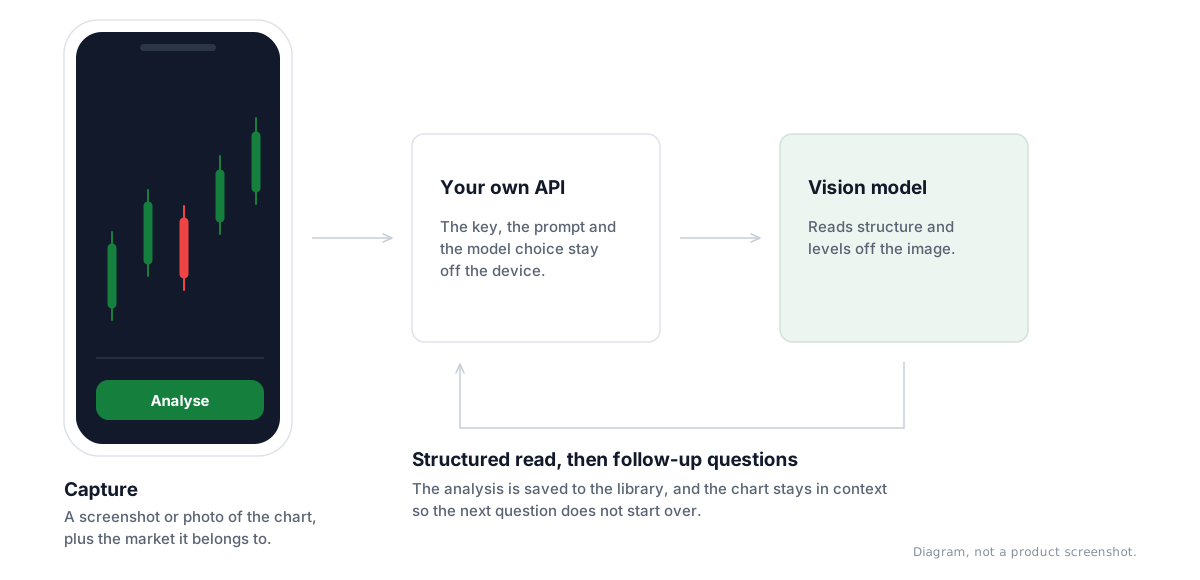
Capture
Camera or photo library, inside a guided flow that asks for a clear, uncropped chart.
Context
Which market the chart belongs to, and the framing to analyse it under.
Backend
The image goes to the app's own API rather than straight to a model provider, so the key, the prompt and the model choice stay off the device.
Read it back
A structured analysis the user can save to their library, or keep asking questions about in a follow-up chat tied to the same chart.
What the user has paid for
Catalogue from the backend
Plan-to-product mapping is fetched rather than compiled in, so pricing can change without an App Store release.
Embedded fallback
If the backend cannot be reached, the app falls back to product ids shipped with the build, so the paywall still works offline.
Verify, then match
A verified transaction is matched against the known premium product ids. One that does not match is treated as a misconfiguration, not as access.
What is in it
A capture flow, not a file picker
Analysis quality depends almost entirely on the image. The flow walks through capture, sharpness, market and context before anything is sent, because a blurry half-cropped chart produces a confident and useless answer.
Follow-up questions on the same chart
The first answer is rarely the one someone needed. The assistant keeps the chart in context so the next question does not start over.
A journal that computes something
Entries feed a statistics engine rather than sitting as notes, so the record is worth keeping beyond the day it was written.
Lessons behind the vocabulary
Ten modules covering what the analysis talks about — support and resistance, moving averages, MACD, order types, long versus short, risk-to-reward, position sizing, stop-loss strategies, emotional control and building discipline — delivered through a lesson player.
Onboarding that asks the right three things
Risk tolerance, portfolio size and investment horizon, collected up front because they change what a useful answer looks like.
What was hard
The device cannot be trusted with entitlement
In-app purchase is the one place where a client-side shortcut turns directly into lost revenue. Product ids come from the backend with an embedded fallback, transactions are verified, and a verified transaction that matches no known premium product is treated as a configuration error rather than quietly granted.
Keeping one flow stable while the shell around it changed
The capture-to-analysis path was reworked visually several times. Keeping the flow's own steps and state separate from its presentation is what made that possible without re-testing the whole path each time.
One build, several environments
The API base URL resolves from the bundle's configuration or the environment rather than being hard-coded, so a debug build, a simulator and a shipped build can point at different backends.
Where it stands
- Released on the App Store as ChartLens AI — Trade Analyzer, a free download requiring iOS 26.2.
- A complete iOS application: 72 Swift files covering capture, analysis, follow-up chat, journal, lessons, onboarding and purchase.
- A backend service carrying the curriculum, the purchase catalogue, receipt handling and notifications.
Next case study
Capnivo
AI captioning for short-form video — transcribe, style, and burn in.